

 Español
 Português
 لالعربية
 Русский
 Bahasa Indonesia
 Français
 Türkçe
 Bahasa Melayu

4GE XPON ONU – Dual-Band AC1200 Wi-Fi (2.4 GHz + 5.8 GHz) with 1200 Mbps Wireless
Access: XPON with GPON/EPON auto‑adaptation.
LAN: 4× Gigabit Ethernet ports (auto‑negotiation, MDI/MDI‑X).
Wi‑Fi: Dual‑band AC1200 (2.4 GHz + 5.8 GHz), supports 802.11a/b/g/n/ac, combined speed up to 1200 Mbps.
Speeds: GPON downlink up to 2.5 Gbps; EPON symmetric 1.25 Gbps.
Features: Bandwidth control, VLAN, ACL, encryption, port isolation, QoS.
Management: TR‑069, OMCI, OAM, Web UI, Telnet.
Range: ~20 km (depends on fiber link).
Application: FTTH, home/office broadband, ISP access.
What is a 4GE XPON ONU with Dual-Band AC1200 WiFi?
The 4GE XPON ONU with Dual-Band AC1200 WiFi is an optical network unit designed for modern FTTH broadband access. It combines GPON and EPON auto-adaptation, four Gigabit Ethernet ports and dual-band 2.4 GHz plus 5.8 GHz wireless coverage in one device, providing high-speed wired and wireless network access for homes, apartments, small offices and operator broadband deployments.
4GE XPON ONU Specification parameters
- Specification parameters
- OPTICAL CHARACTERISTICS
Technical Parameter
| User interface | 4×10/100/1000M RJ45 port 2.4G WiFi / 5G WiFi |
| PON | EPON & GPON mode adaptive Interface Type: SC-UPC / SC-APC Security: ONU authentication mechanism Network coverage radius: 20KM GPON: upstream 1.25Gbps / downstream 2.5Gbps Optical receive sensitivity: -7dBm ~ -28dBm Continuous light power: 0.5dBm ~ +5dBm EPON: upstream 1.25Gbps / downstream 1.25Gbps Optical receive sensitivity: -7dBm ~ -27dBm Continuous light power: 0dBm ~ 4dBm |
| Ethernet | 4×10/100/1000M auto-negotiation Full/half duplex mode RJ45 connector Car MDI/MDI-X 100m distance |
| Size | 160mm (L) × 110mm (W) × 25mm (H) |
| Environment | Operating temperature: 0℃ ~ 60℃ Operating humidity: 10% ~ 85% non-condensing Storage temperature: -40℃ ~ 80℃ Storage humidity: 5% ~ 95% non-condensing |
| Power supply | 12V 1.5A DC Power interface size: 2.1mm / 5.5mm |
| Power consumption | |
| Management | WEB / TELNET / TR069 / ONUI / OAM |
Product Interfaces and Indicators Definitions
POWER
| Power status | On: The ONU is powered on Off: The ONU is powered off |
PON
| ONU Register | On: Successfully registered to OLT Blinking: Registering to OLT Off: Registration failed |
LOS
| Optical Signals | On: Optical link below receiver sensitivity Off: Optical link normal |
LAN
| LAN Port status | On: Ethernet connection normal Blinking: Data transmission in progress Off: No Ethernet connection |
2.4G
| WiFi | On: Wi-Fi enabled Blinking: Data transmission in progress Off: Wi-Fi disabled |
5G
| WiFi | On: Wi-Fi enabled Blinking: Data transmission in progress Off: Wi-Fi disabled |
WPS
| WPS | On: Terminal connected Blinking: Connecting Off: Not connected |
NET
| Internet status | On: ONU can access internet Off: ONU cannot access internet |
Product Structure & Composition
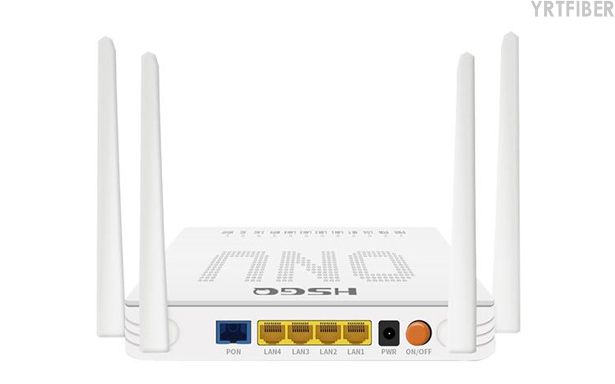
PON Optical Interface: XPON auto-adapts to GPON or EPON per the connected OLT.
4 × Gigabit Ethernet LAN Ports: Four GE ports with auto‑negotiation and MDI/MDI‑X for simple wired connections.
Dual‑Band WiFi Module: AC1200 dual‑band (2.4 GHz + 5.8 GHz) – 2.4 GHz for wider coverage, 5.8 GHz for higher speed and less interference.
Management and Security Functions: Supports VLAN, ACL, port isolation, QoS, bandwidth control, encryption, and remote management (TR‑069. OMCI, etc.) to manage traffic and enhance security.
Device Housing and Indicators: Compact case with LED indicators for power, PON, LAN, and WiFi to quickly check operational status.
Benefits of 4GE XPON ONU
1. Dual‑Mode PON & Long‑Reach Access
This XPON ONU automatically adapts to GPON or EPON networks, with GPON downlink up to 2.5 Gbps and EPON symmetric 1.25 Gbps. Transmission range reaches approximately 20 km, depending on optical power, splitter ratio, fiber quality, and OLT configuration – suitable for diverse FTTH deployments.
2. Wired & Wireless Connectivity
It features 4 Gigabit Ethernet ports for connecting multiple wired devices (IPTV, PCs, cameras, etc.) and built‑in dual‑band AC1200 Wi‑Fi (2.4 GHz + 5.8 GHz, 802.11a/b/g/n/ac) delivering a combined speed of 1200 Mbps, balancing coverage and performance for high‑density environments.
3. Traffic Control, Security & Remote Management
Advanced features include bandwidth management, dynamic VLAN, ACL filtering, encryption, port isolation, and QoS. Remote administration is supported via OMCI, OAM, TR‑069. Web UI, and Telnet, enabling operators to configure, monitor, and troubleshoot without on‑site visits.
Engineering Applications 4GE XPON ONU
Shipping & Packaging
Product Comparison:
4GE AC1200 XPON ONU vs 1GE + 3FE 2.4G WiFi XPON ONU
| Feature / Dimension | 4GE XPON ONU with Dual-Band AC1200 WiFi | 1GE + 3FE XPON ONU with 2.4G WiFi 300M |
|---|---|---|
| PON Compatibility | Supports GPON and EPON dual-mode auto-adaptation. | Supports GPON and EPON dual-mode access. |
| LAN Ports | 4 × Gigabit Ethernet ports for high-speed wired connections. | 1 × Gigabit Ethernet port and 3 × Fast Ethernet ports. |
| Wireless Standard | Supports IEEE 802.11a/b/g/n/ac. | Supports IEEE 802.11b/g/n. |
| WiFi Bands | Dual-band 2.4 GHz + 5.8 GHz. | Single-band 2.4 GHz. |
| Wireless Speed | Up to 1200 Mbps combined wireless speed. | Up to 300 Mbps wireless speed. |
| Voice Port | Not specified in the current product information. | Includes 1 POTS voice port. |
| USB Port | Not specified in the current product information. | Includes 1 USB port. |
| Traffic Management | Supports bandwidth control, dynamic VLAN, ACL, encryption, port isolation and QoS. | Supports common remote management and service configuration functions. |
| Remote Management | Supports OMCI, OAM, Web interface, Telnet and TR-069. | Supports OMCI, Web UI, Telnet, TR-069 and OAM. |
| Best Choice For | Users needing faster WiFi, more Gigabit LAN ports and stronger traffic control. | Users needing broadband, basic WiFi, POTS voice and USB expansion in one unit. |
4GE XPON ONU Selection Guide
Choose the 4GE AC1200 XPON ONU for Higher Wireless Performance
If the project requires faster WiFi, dual-band wireless access and support for many connected devices, the 4GE XPON ONU with AC1200 WiFi is the better choice. The 5.8 GHz band is especially useful for higher-speed wireless applications, while the 2.4 GHz band provides wider indoor coverage.
Choose the 4GE AC1200 Model for More Gigabit Wired Connections
If users need to connect multiple wired devices such as PCs, IPTV terminals, routers, smart TVs or office equipment, the four Gigabit Ethernet ports provide better wired performance than models with only one GE port and several FE ports.
Choose the 1GE + 3FE 2.4G Model for Voice and USB Requirements
If the project requires a POTS voice port or USB expansion, the 1GE + 3FE + POTS + USB model may be more suitable. It is a good option for users who need integrated broadband, voice service and basic 2.4 GHz WiFi.
Choose Based on Operator Network and Service Plan
Before selecting an ONU, confirm the OLT compatibility, GPON or EPON network mode, required VLAN settings, WiFi performance requirements, voice service needs and remote management method. This helps ensure smooth provisioning and stable long-term operation.
Installation Steps
Check device – Verify ONU, power adapter, and accessories are intact and match requirements.
Connect fiber – Plug the drop fiber into the PON port; keep connector clean and avoid sharp bends.
Connect wired devices & power – Attach computers, IPTV, etc. to LAN ports; then connect the power adapter and turn on.
Check LEDs – Observe power, PON, LAN, and WiFi indicators. If PON is abnormal, check fiber connection and service provisioning.
Configure network – Set WiFi name/password, VLAN, QoS, etc. via Web UI or remote management (OMCI/TR‑069).
Test services – Verify wired and 2.4G/5.8G wireless connectivity, speed, and remote management functions.
Download YRTFIBER Product Catalog
Factory Real Shot
Frequently Asked Questions & Quick Inquiry
4GE XPON ONU FAQ
Q1: What Wi-Fi standards and speeds are supported?
Supports 802.11ac (dual-band), delivering up to 1200 Mbps combined wireless throughput.
Q2: Can the ONU automatically switch between GPON and EPON?
Yes—it auto-detects and adapts to GPON or EPON signals for flexible deployments.
Q3: How far can this ONU cover over fiber?
It supports up to 20 km transmission distance, suitable for long-reach FTTH scenarios.
Q4: Is remote management supported?
Yes—remote configuration is available via OMCI, OAM, TR-069. Web UI, and Telnet.
Q5: What security and traffic controls does it offer?
Includes ACLs, VLAN segmentation, QoS, rate limiting, encryption, and port isolation to ensure secure and prioritized traffic delivery.
Does this 4GE XPON ONU support both GPON and EPON?
Yes. This ONU supports GPON and EPON dual-mode auto-adaptation, allowing it to work in different PON network environments depending on the connected OLT and operator configuration.
What is the wireless speed of this ONU?
The ONU supports dual-band AC1200 WiFi with up to 1200 Mbps combined wireless speed. Actual wireless speed may vary depending on distance, wall obstruction, interference, connected device capability and network conditions.
What is the difference between 2.4 GHz and 5.8 GHz WiFi?
The 2.4 GHz band usually provides wider coverage and better wall penetration, while the 5.8 GHz band usually offers higher speed and less interference over shorter distances. Using both bands helps balance coverage and performance.
How many wired devices can this ONU connect?
The device provides 4 Gigabit Ethernet RJ-45 LAN ports, allowing up to four wired devices to connect directly. Additional devices can be connected through a switch or router if required.
Does the ONU support remote management?
Yes. It supports remote management and configuration through OMCI, OAM, TR-069, Web interface and Telnet. These functions are useful for operators and network administrators.
Does this ONU support VLAN and QoS?
Yes. The device supports dynamic VLAN, QoS, bandwidth control, ACL filtering, data encryption and port isolation. These functions help manage service quality and improve network security.
What is the typical fiber transmission distance?
The fiber transmission distance can reach up to approximately 20 km. The actual distance depends on optical power budget, fiber quality, splitter ratio, connector loss and OLT configuration.
Where is this 4GE XPON ONU commonly used?
It is commonly used in FTTH home broadband, small office networks, ISP access projects, apartment networks, IPTV service access and smart home network environments.
Send Your Inquiry
Fill out the form below and we'll get back to you within 24 hours.


